
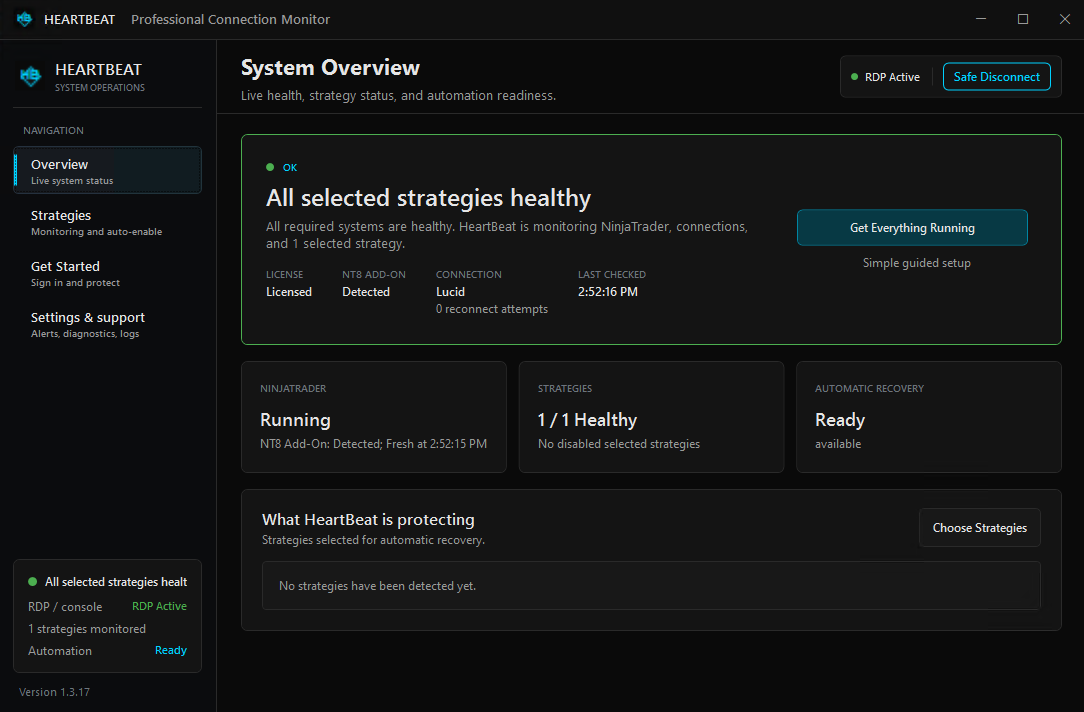
A server can be online while the trading workflow running inside it is not ready. Reliable oversight starts by separating four questions: Is NinjaTrader running? Are the required connections healthy? Is the add-on responding? Are the strategies you chose actually enabled?
NinjaTrader documents Recalculate as the default ConnectionLossHandling option and 10 seconds as the default DisconnectDelaySeconds value. Those settings govern a running strategy's response to connection loss; they do not ensure that a retained chart strategy is enabled again after NinjaTrader restarts.
- A strategy applied to a retained NinjaTrader chart can remain applied after restart while its Enabled property is false.
- NinjaTrader can report distinct order-system and price-feed status values for a connection.
- Re-enabling a strategy deserves validation because strategy position and account position are not the same concept.
- While the VPS and HeartBeat Windows service are running, HeartBeat can monitor continuously and attempt only the local recovery actions you configure.
Why a strategy can be present, but not running
NinjaTrader's official help guide explains that after the platform is shut down and reopened, a strategy applied to a retained chart can remain on that chart while its Enabled property is false. That behavior matters whenever the application is closed for maintenance or an update, or is relaunched after an unexpected exit. Review NinjaTrader's automated-strategy guidance.
This persistence behavior applies to a strategy on a retained chart; closing that chart removes the strategy rather than leaving it applied and disabled.
A second distinction is easy to miss: NinjaTrader can report distinct order-system and price-feed status values for a connection. A connection problem is therefore more nuanced than a single red-or-green light. NinjaTrader documents those status streams separately.
Application restart
NinjaTrader may be closed for maintenance, an update, a scheduled restart, or an unexpected process failure. A running Windows session does not prove the application recovered.
Connection interruption
A brokerage or data connection can disconnect, reconnect, or return in a partial state. Recovery should be based on the watched connection you actually depend on.
Strategy disabled
A strategy can still appear in the platform while not being enabled. That makes visual presence an unreliable substitute for explicit state monitoring.
Maintenance window
A scheduled NinjaTrader restart—or a separate Windows or VPS restart managed outside HeartBeat—is only operationally complete when the required chain returns.
Check the native connection-loss policy first
NinjaTrader gives each NinjaScript strategy a ConnectionLossHandling setting. This controls how that strategy responds when a connection loss is detected; it is separate from relaunching NinjaTrader or re-enabling a retained chart strategy after the application restarts. NinjaTrader documents three possible values and identifies Recalculate as the default. Read the official ConnectionLossHandling reference.
| Option | Documented behavior | Operational question |
|---|---|---|
KeepRunning |
Keeps the strategy running. When the connection is reestablished, the strategy resumes as if no disconnect occurred. | Have you tested what your strategy should do while its required feed or order connection is unavailable? |
RecalculateDocumented default |
Stops under NinjaTrader's documented feed and order conditions, then attempts to recalculate the strategy position when the connection is reestablished. If reconnection occurs before the strategy is stopped, it continues without recalculating as if no disconnect occurred. | Do you understand the strategy-position, account-position, startup, and synchronization consequences of recalculation? |
StopStrategy |
Stops the strategy after the disconnect lasts longer than DisconnectDelaySeconds. NinjaTrader takes no action for that strategy when the connection is reestablished. |
What supervised or separately configured process will review the account and decide whether to restart it? |
For Recalculate, NinjaTrader says a data-feed loss longer than DisconnectDelaySeconds stops the strategy; an order-feed loss stops it if the strategy places an order action while disconnected; and a simultaneous data-and-order-feed loss longer than the delay stops it. The related DisconnectDelaySeconds property defines how long a disconnect must last before connection-loss handling acts, and its documented default is 10 seconds. Read the official DisconnectDelaySeconds reference.
There is no universal best setting. The appropriate choice depends on the strategy, provider behavior, account state, synchronization settings, and how the operator supervises a disconnect. Review and test the exact workflow in a controlled environment before using it with a live account.
Safe recovery is more than clicking Enable
Restarting software is straightforward. Restoring an automated strategy deserves more care. NinjaTrader distinguishes a strategy's internal position from the live account position. Those two states can diverge, and the platform's synchronization settings influence what happens when a strategy starts. Read about strategy versus account position.
NinjaTrader warns that account synchronization can close positions or submit live orders. Startup synchronization occurs once and does not guarantee that account and strategy positions remain synchronized afterward. That is why each trader should understand and test their own synchronization and start settings before enabling recovery automation. HeartBeat observes and acts on the recovery rules you configure; it does not choose the trading logic or account-synchronization policy for you. Review NinjaTrader's synchronization documentation.
A practical pre-recovery checklist
- Confirm the interactive Windows desktop is available for actions that require the NinjaTrader interface.
- Confirm NinjaTrader and the HeartBeat add-on are reporting current status.
- Watch the specific brokerage or data connection required by the workflow.
- Add only the strategies you intentionally want HeartBeat to monitor.
- Set cooldowns and attempt limits that avoid repetitive recovery loops.
- Test startup, synchronization, and strategy behavior in a controlled environment before relying on it.
Important boundary: HeartBeat does not create trade signals, select entries, modify strategy logic, or directly place trades. If a selected strategy is restored, it continues according to that strategy's own configuration and the state of NinjaTrader and the connected account.
From detection to a controlled response
HeartBeat combines a Windows background service with its operator dashboard for NinjaTrader environments. The service watches the operating chain instead of treating a live VPS as proof that everything inside it is healthy. Recovery features are opt-in, so the same installation can be used for monitoring only or for selected configured actions.
Observe NinjaTrader, watched connections, the add-on, and selected strategy state.
Check prerequisites, current conditions, cooldowns, and attempt limits before acting.
Attempt only the local actions enabled in the user's HeartBeat configuration.
Track the requested recovery and expose the resulting status for operator review.
Depending on configuration and the condition detected, HeartBeat can attempt watched-account reconnection, relaunch NinjaTrader after a crash, restore selected strategies, or perform a scheduled NinjaTrader restart configured in HeartBeat. HeartBeat does not restart Windows or the VPS. Its dashboard keeps the latest check, process health, add-on health, connection and reconnect attempts, selected-strategy health, recovery activity, and diagnostics together.
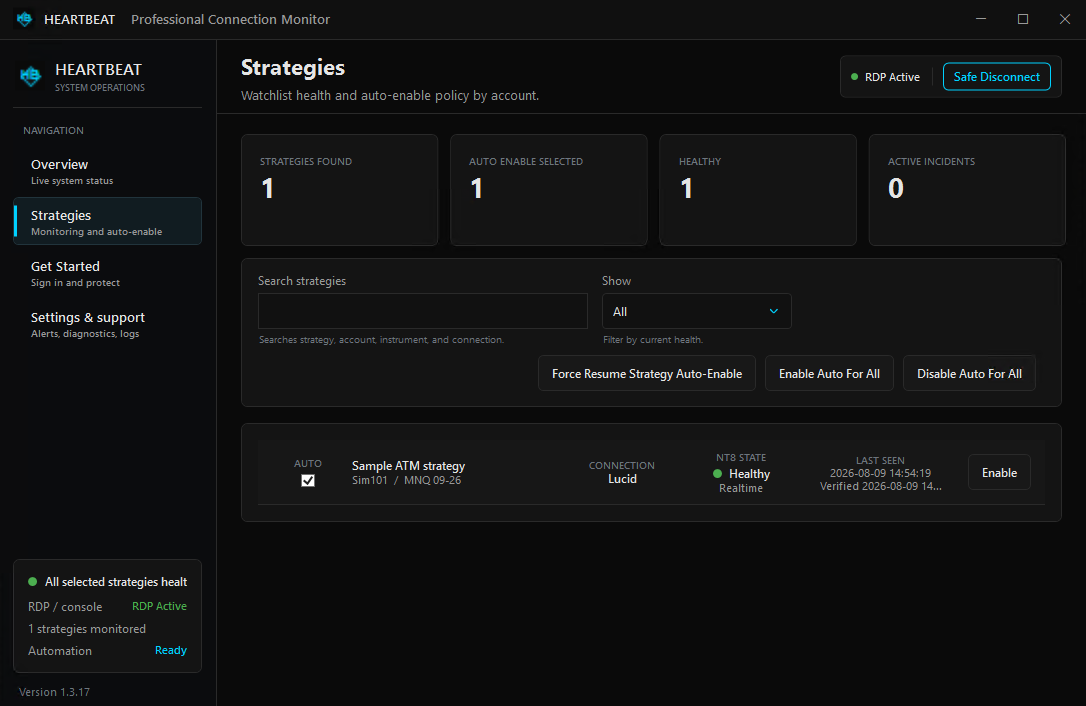
See strategy recovery in a real workflow
This short walkthrough shows HeartBeat working with NinjaTrader to monitor and restore selected strategy state. Use it to understand the operator experience, then test your own settings under controlled conditions.
What HeartBeat can monitor—and what it cannot guarantee
HeartBeat is designed for operational visibility and configured local recovery. It does not replace NinjaTrader, your broker, market-data provider, network, Windows session, or VPS. Any one of those upstream systems can affect availability, and no monitoring tool can guarantee uninterrupted service.
If the VPS itself shuts down and does not restart or become reachable again, HeartBeat cannot run or control that outage. Its Windows service operates inside the VPS; it cannot power on, repair, or reconnect the host machine from the outside. Once Windows and the HeartBeat service are running again, HeartBeat can resume monitoring and evaluate the recovery actions configured inside that environment.
Actions that use the NinjaTrader user interface require an interactive Windows desktop. A locked or unavailable session, platform dialog, upstream outage, or unexpected application state may prevent a recovery attempt from completing. The dashboard and diagnostics are there so the operator can see what HeartBeat observed and decide what to do next.
HeartBeat does not remove the operator's responsibility to supervise automated trading, review account state, and respond when recovery cannot complete. NinjaTrader likewise recommends that automated strategies remain close enough to supervise and manage when something goes wrong.
Good candidates for HeartBeat
- Traders who run NinjaTrader on a Windows computer or VPS and want one operational status view.
- Operators who need monitoring outside the moments they are actively watching the desktop.
- Users who understand their strategy startup and synchronization settings and want controlled, limited recovery attempts.
- Anyone who prefers monitoring-only mode until their recovery workflow has been tested.
HeartBeat FAQ
What is NinjaTrader's default ConnectionLossHandling setting?
The documented default is Recalculate. If a qualifying connection loss stops the strategy, NinjaTrader attempts to recalculate its strategy position when the connection is reestablished.
Which ConnectionLossHandling option should I use?
There is no universal choice. KeepRunning, Recalculate, and StopStrategy have different behavior during and after a disconnect. Review the official definitions and test the option against your strategy, provider, account, and supervision process before live use.
Will a chart strategy stay enabled after NinjaTrader restarts?
No. NinjaTrader documents that a strategy on a retained chart remains applied after restart, but its Enabled property is set to false. Closing the chart removes the strategy instead of preserving it.
Does HeartBeat place trades?
No. HeartBeat monitors operational state and can attempt configured local recovery actions. It does not create entry signals, choose trades, or directly place orders. A restored NinjaTrader strategy operates according to its own logic and settings.
What can HeartBeat attempt to recover?
Depending on the user's configuration and current conditions, HeartBeat can attempt watched-account reconnection, NinjaTrader relaunch after a crash, restoration of selected strategies, and scheduled NinjaTrader restarts.
Can I use HeartBeat for monitoring only?
Yes. Recovery actions are opt-in. You can begin with visibility and diagnostics, then enable only the actions you have reviewed and tested.
What happens if the VPS itself goes offline?
HeartBeat runs as a Windows service inside the VPS. If the VPS powers off, cannot boot, or stays unreachable, HeartBeat cannot run or restore the host from outside it. When the VPS and Windows service return, HeartBeat can resume its internal monitoring and configured recovery workflow.
Does HeartBeat guarantee uninterrupted strategy operation?
No. It improves visibility and can attempt configured local recovery, but availability still depends on Windows, NinjaTrader, connections, account state, strategy settings, and third-party infrastructure.
Sources and further reading
- NinjaTrader: ConnectionLossHandling
- NinjaTrader: DisconnectDelaySeconds
- NinjaTrader: Working with automated strategies
- NinjaTrader: Syncing account positions
- NinjaTrader: Strategy position versus account position
- NinjaTrader: Connection status updates
- NinjaTrader: The strategy development process
- FLB HeartBeat product page
This guide was prepared by the First Light Beacon Product Team with AI-assisted research and drafting. Technical statements were checked against the linked official NinjaTrader documentation, and HeartBeat statements against current public product documentation. Product capabilities and checkout terms can change; confirm current details before purchasing.
NinjaTrader is a registered trademark of NinjaTrader Group, LLC. First Light Beacon is not affiliated with or endorsed by NinjaTrader.