
Bull, bear, or neutral
See the current directional regime without translating several separate studies.
Read directional state, regime maturity, and confirmed shifts in one focused lower-panel view on TradingView or NinjaTrader 8—without adding another price overlay to the chart.
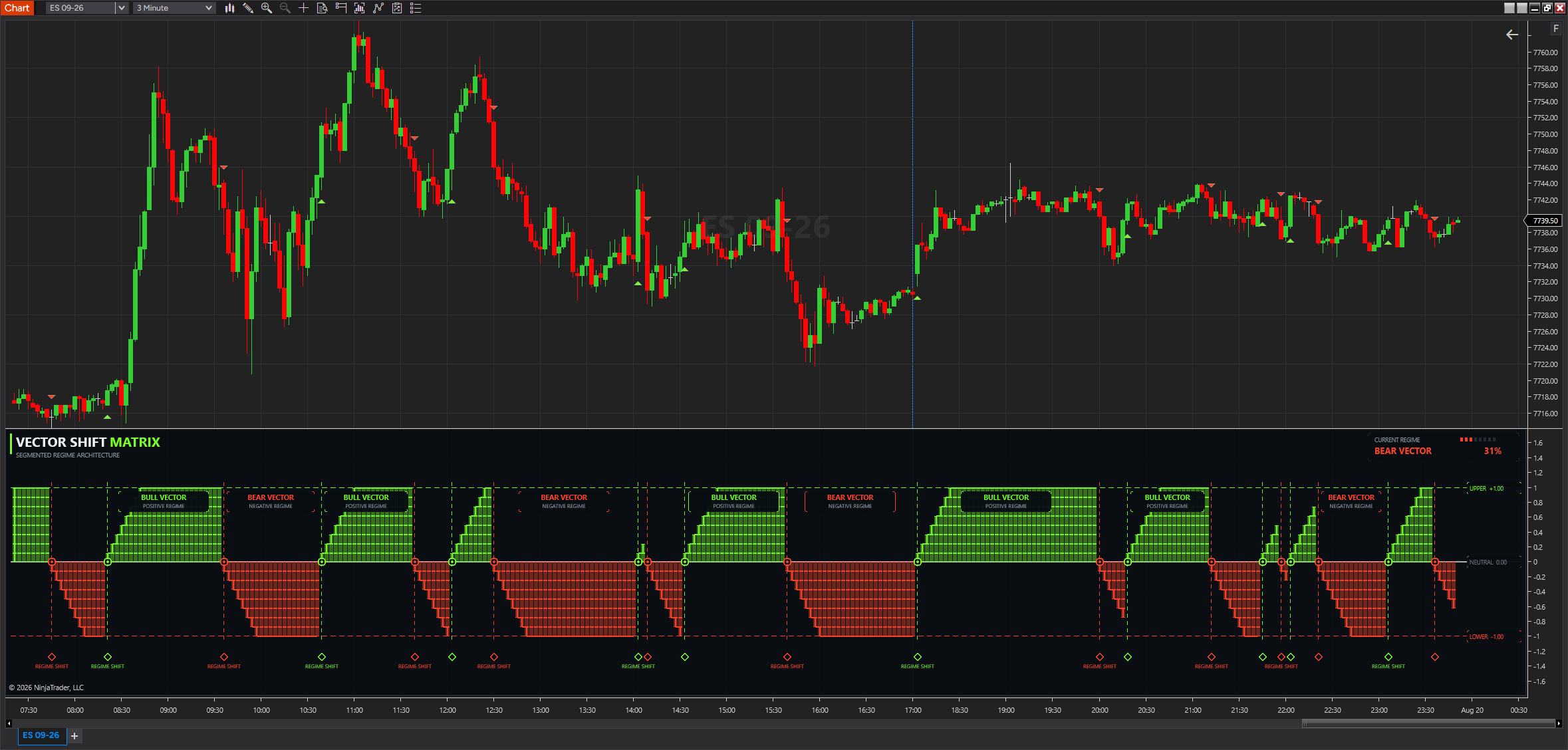
Vector Shift Matrix converts the active chart state into a visual bull, bear, or neutral regime. Its segmented build shows how established that state has become, while the status card keeps confirmation and confidence visible at a glance.
See the current directional regime without translating several separate studies.
Watch a newly confirmed regime build toward full visual strength across successive bars.
Separate an intrabar preview from the steady state retained after bar-close confirmation.
Green is bullish, red is bearish, and gray is neutral.
A blinking direction is an unconfirmed live preview. A steady label is confirmed.
Compare a fresh state with a more established one; do not treat the percentage as an entry by itself.
Use market structure, Trade Shield, and defined risk rules for the actual decision.
The controls are grouped by the part of the experience they change. This reference describes their practical effect without publishing the proprietary construction behind the signal.
| Group | Controls | Practical use |
|---|---|---|
| Vector Engine | Length, Boundary Threshold, Smoothing | Balance responsiveness against a steadier regime read. |
| Matrix Structure | Bars To Full Strength, Vertical Segments, Cell Gap, Opacity | Control how quickly and clearly the matrix fills. |
| Layout | Panel, header, grid, labels, and markers | Keep the full dashboard or reduce it to only the elements you use. |
| Signals & Live Confirmation | Price signals, offset, preview blink, interval | Place markers cleanly and distinguish developing movement from a confirmed shift. |
| Alerts | Bull shifts, bear shifts, sound, rearm | Choose which confirmed events should reach the NinjaTrader Alerts Log. |
Vector Shift Matrix is available for TradingView and NinjaTrader 8. TradingView access is provisioned to the eligible member's TradingView account; the NinjaTrader 8 version is installed, licensed, and updated through FLB Control Center. See what the Pro edition adds.
FLB Pro and Automation include Vector Shift Matrix Pro. FLB Suite includes the standard Vector Shift Matrix edition.
Yes. TradingView access is added to the eligible member's TradingView account. The NinjaTrader 8 version is installed and updated through FLB Control Center.
No. Blinking identifies a developing intrabar preview. Wait for the bar to close and the state to become steady.
No. Confidence describes the displayed regime. Use it with your normal structure, confirmation, and risk process.
Yes. Turn off Show Price Signals to keep the bull and bear information inside the lower panel.
TradingView access updates through the hosted TradingView publication. For NinjaTrader 8, open NinjaTrader Tools in FLB Control Center and use the Vector Shift Matrix product card.
Eligible members receive TradingView access through their TradingView account and install or update the NinjaTrader 8 version through FLB Control Center.